A Premium Listing provides you with advanced tools to enhance how your property is visible and presented within the SafariOffice, SafariBookings, and SafariBuddy ecosystem for tour operators and their clients.
If you want to make a real impact and have a strong presence within these platforms, a Premium Listing will help you stand out from the basic listings and also offers your partners better options to sell your property, as well as more data insights.
Below is a short summary of the benefits of Premium Listing features.
Premium Listings get the Premium Badge and a ranking boost in the default search order.
Premium badge and widget in the directory (with direct access to the Co-branded Digital Page)

Premium badge and info state in the builder
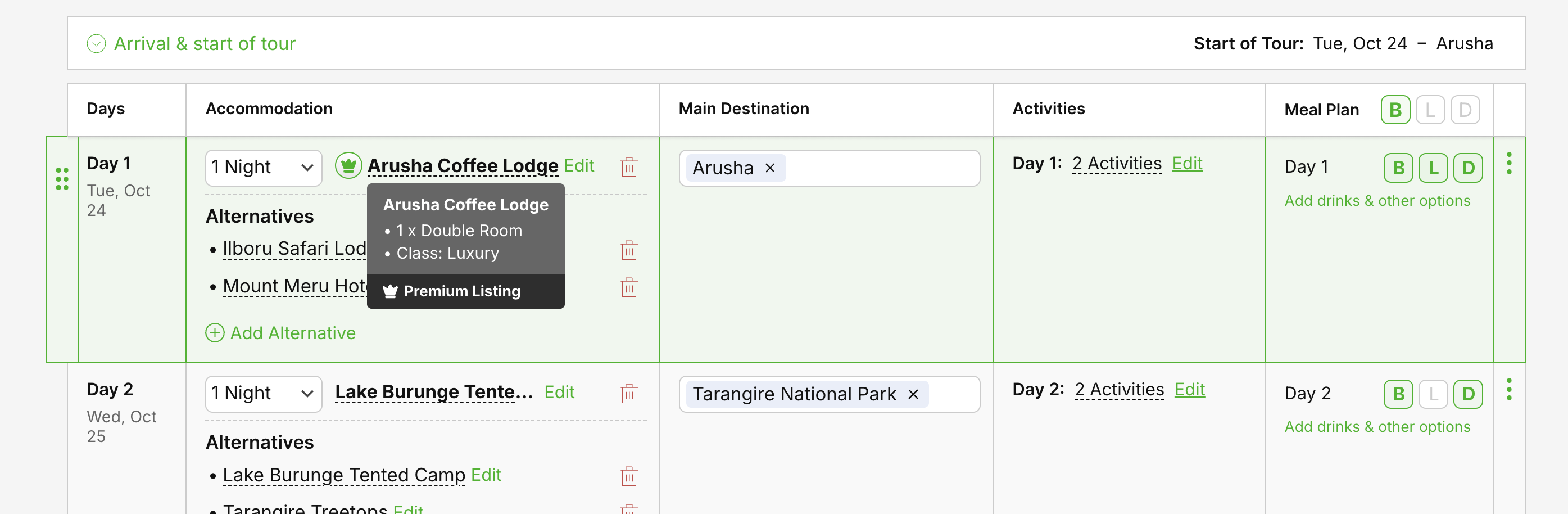
These create much more reach and visibility, and more options to convert.
They can be:
Part of itinerary proposals, shared with individual clients
Embedded on partners' websites
Shareable as separate pages via email, WhatsApp, or social media by your partners
Part of tours shared online in partners' marketing campaigns
Part of email campaigns by partners.
Example of a Co-branded Digital Page (shared by demo company Rhino Tours)
https://rhinotours.safarioffice.app/accommodations/nyota-luxury-demo
Give your partners the best tools to inspire and convert clients to book their tour with your property included.
Example of a branded website (.site) (which you can also use for your B2B marketing)
https://nyota-luxury-demo.safarioffice.site/
Same webpage with only your branding, easy for you to use in marketing campaigns for B2B and for public display when not shared by a tour company.
Give your partners easy access to the documents they need to build the best tours and close bookings faster, right inside the tool they are using at the moment they need it.
Enable the sharing of relevant additional documents and set visibility (public or B2B only).
Share links to availability portals, reservation systems, or simply to additional files or terms and conditions on an external page.
Booking funnel insights, how many quotes were sent with your property in them, and how many online tours
Get trends on the origin of travellers, listing views, and number of nights booked.
Insights into business partner behaviour on SafariOffice and SafariBookings
Premium comes with a 14-day free trial. See Basic vs. Premium Listings for prices, and Managing Your Subscription for how to upgrade.

How to use Data Insights
Learn how to track your property's performance. Access the Insights tab to monitor your usage overview, booking funnel progression, operator engagement, and key traveler trends.
Basic vs. Premium Listings: From Directory Presence to Active Sales Engine
A quick guide to the differences between Basic and Premium Listings, so you can choose the right plan for your property.
Managing Your Subscription
About managing your Premium Subscription, Billing info, plan switches and cancelletions
